Unlocking the Power
for Home Builders
By: Jay P. Christofferson
Published by: National Association of Home
Builders (NAHB)
Create your own Customized Estimating Program!
Most builders estimate with Excel because it's
easy to learn, quick to use, and can be customized to your style of
estimating.
Here you'll find step-by-step how to create your own
customized automated spreadsheet estimating program for use with
Excel 2007
You'll learn how to use the magic of Excel in
creating detail sheets, cost breakdown summaries, and linking.
You'll put this all to use in estimating concrete, rebar, permit
fees, and roofing. You can even create your own macros.
Includes a CD-ROM that
illustrates examples in the book and provides you with templates you
can use to set up your own estimating system.
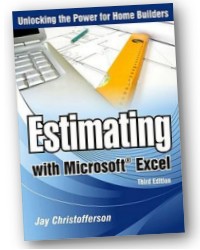
Estimating with Microsoft® Excel:
Unlocking the Power for Home Builders gives you step-by-step
instructions on how to create a powerful estimating program that
will help you save time, increase productivity, and improve the
accuracy of your estimates.
Author Jay Christofferson, one of the
countries leading experts in computerized estimating for home
builders, teaches you how to build a fully customized estimating
program without buying expensive specialized software or hiring a
consultant. Christofferson's innovative instructional text is
complemented with a CD-ROM that illustrates examples in the book and
provides you with templates you can use to set up your estimating
system.
From programming basic formulas to
sophisticated applications like automating Excel to integrate with
other software packages, Estimating with Microsoft® Excel
will help you set up an accurate, efficient estimating system. With
easy-to-understand examples and screen shots, you will create
estimating operations powerful and reliable enough for your most
important management decisions.
Contents:
List of Figures, vii
List of Tables, xii
Foreword, xiii
About the Author, xv
Acknowledgments, xvii
Introduction, 1
Chapter 1, The Basics of Spreadsheets and Beyond, 5
Chapter 2, Improving Estimating by Using Spreadsheets, 23
Chapter 3, Creating a Cost Breakdown Summary Sheet, 35
Chapter 4, Eliminating Steps by Using Detail Sheets, 47
Chapter 5, Saving Time with Hyperlinks, 73
Chapter 6, Letting Formulas and Functions Do the Work, 79
Chapter 7, Calculating Profit Margin, 99
Chapter 8, Making Spreadsheets User Friendly with Form Controls,
109
Chapter 9, Automating Spreadsheets, 121
Notes, 145
Resources, 147
Index, 149
158 pages
8-1/2 x 11 in.
Related:
2017
NEC
& Related Products


>>
Tools for
Electricians
<<
* * * * * * *
RACK-A-TIERS
Specialty Electrical Tools

086718549X
/ 9780867186475
|















 Order online:
 Add
Add  Order offline:


